


Ask your money anything.
Connect your ether.fi account to the AI assistant you use and turn your own data into pages you can explore.
Explore examplesYou’ve spent $2,184 in the last 30 days.
Busiest day: 20 Sep, $163
- Subscriptions
- $113
- Everyday
- $1,437
- One-offs
- $634
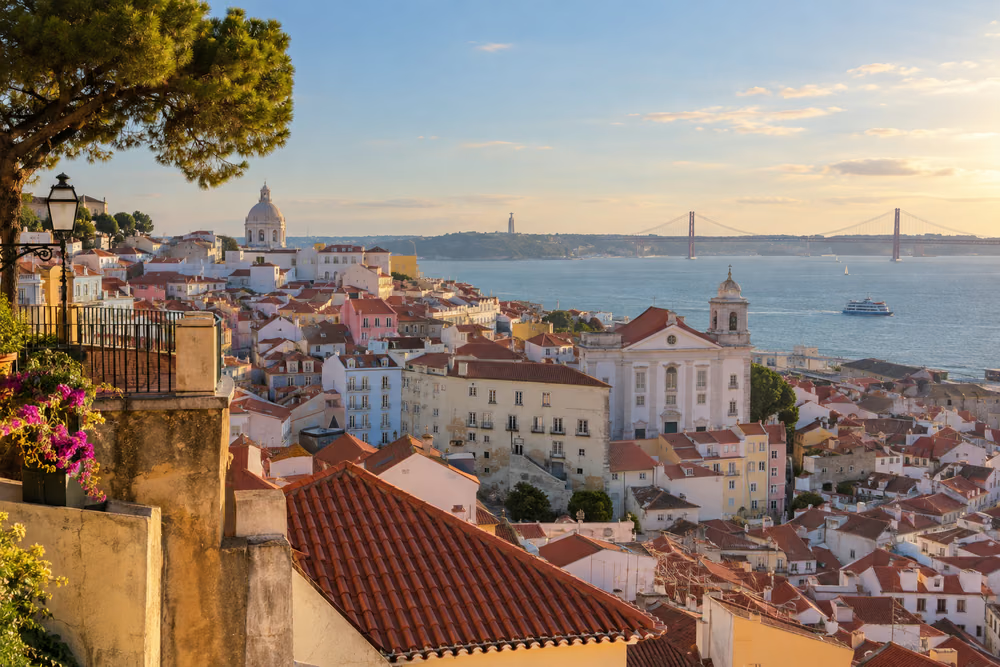

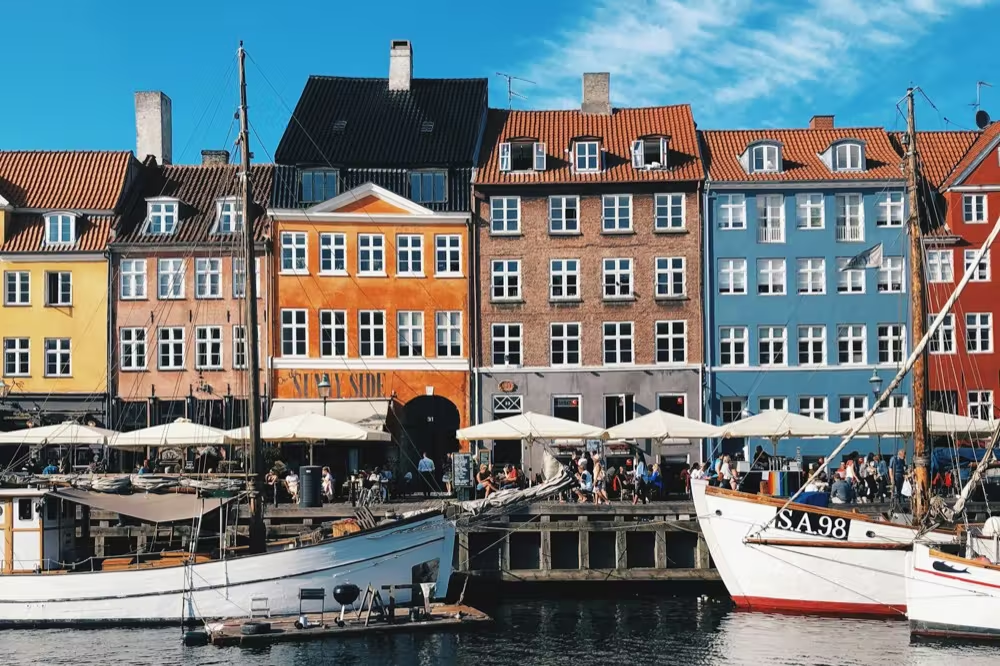
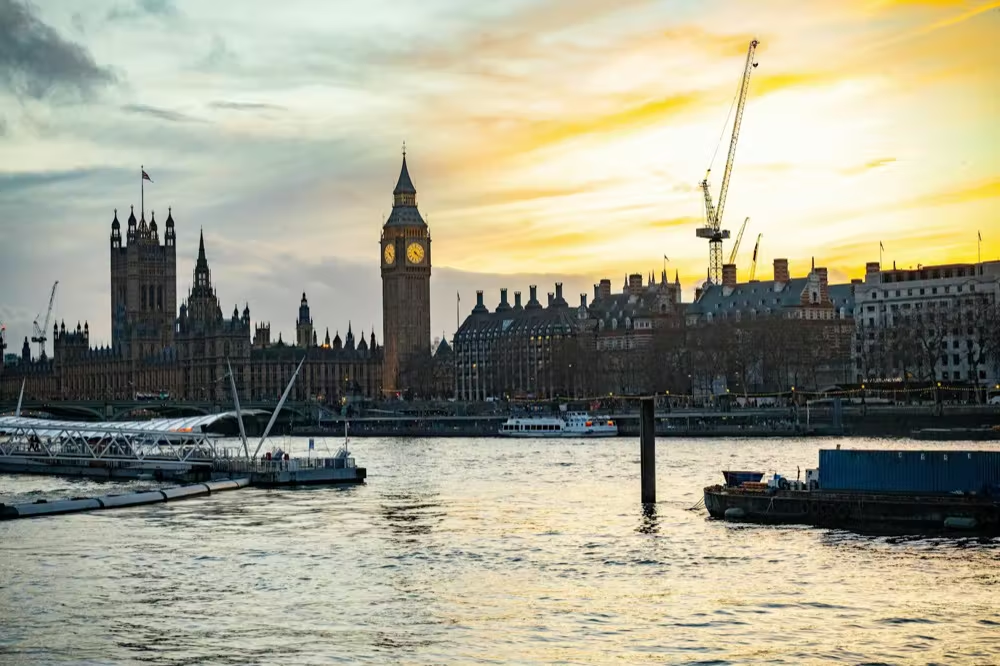
You spent $3,642.81 across five cities.
Lisbon → Madrid → Zurich → Copenhagen → London
- Dates
- 3–15 Sep · 13 days
- Daily average
- $280.22
- Transactions
- 27
Daily spending · 13 Sep, $771.46
3 Sep15 Sep
Accommodation$2,392.23
Food & Dining$533.70
Transport$609.56
Activities$107.32
- €1,227.30
- $1,359.25
- 1 EUR = $1.1075
- CHF 645.30
- $767.26
- 1 CHF = $1.1890
- DKK 4,145.00
- $615.54
- 1 DKK = $0.1485
- £672.30
- $900.76
- 1 GBP = $1.3398
| 3 Sep | Time Out Market | €46.50 | $51.50 |
| 3 Sep | Lisboa Plaza Hotel | €312.00 | $345.54 |
| 4 Sep | Pastéis de Belém | €9.60 | $10.63 |
| 4 Sep | Cervejaria Ramiro | €71.40 | $79.08 |
| 5 Sep | A Vida Portuguesa | €38.00 | $42.09 |
| 5 Sep | Uber | €14.20 | $15.73 |
| 6 Sep | TAP Air Portugal | €128.00 | $141.76 |
| 6 Sep | Hotel Urban Madrid | €456.00 | $505.02 |
| 7 Sep | Museo del Prado | €15.00 | $16.61 |
| 7 Sep | Sobrino de Botín | €86.40 | $95.69 |
| 8 Sep | Mercado de San Miguel | €38.20 | $42.31 |
| 8 Sep | Metro de Madrid | €12.00 | $13.29 |
| 9 Sep | SWISS | CHF 164.00 | $195.00 |
| 9 Sep | Hotel Schweizerhof | CHF 418.00 | $497.00 |
| 10 Sep | Zeughauskeller | CHF 54.50 | $64.80 |
| 10 Sep | SBB | CHF 8.80 | $10.46 |
| 11 Sep | SAS | DKK 1,120.00 | $166.32 |
| 11 Sep | Hotel Sanders | DKK 2,650.00 | $393.53 |
| 12 Sep | Torvehallerne | DKK 210.00 | $31.19 |
| 12 Sep | Tivoli Gardens | DKK 165.00 | $24.50 |
| 13 Sep | Heathrow Express | £25.00 | $33.50 |
| 13 Sep | The Hoxton Holborn | £486.00 | $651.14 |
| 13 Sep | Dishoom | £64.80 | $86.82 |
| 14 Sep | Borough Market | £22.50 | $30.15 |
| 14 Sep | Tate Modern | £18.00 | $24.12 |
| 15 Sep | Flat Iron | £31.00 | $41.53 |
| 15 Sep | Heathrow Express | £25.00 | $33.50 |
Week 23$358
- Café $140
- Market $83
- Department store $65
- Cinema $43
- Pharmacy $27
- Spent so far
- $10,169
- Cashback paid
- $254.26
- Saturday draw
- $8.95
- to the Rivas house
- 01
Add the connector
Add ether.fi in your AI assistant’s connector settings.
- 02
Choose what it can read
Pick the account, then approve the data it can read.
- 03
Ask for a page
Copy an example prompt, or ask your own question. Make it yours.
Understand your money.
See where it goes, what repeats, and what it earns.
Spending by category and by merchant over 7, 30 or 90 days, split into subscriptions, everyday spending and one-offs.
You’ve spent $2,184 in the last 30 days.
Busiest day: 20 Sep, $163
- Subscriptions
- $113
- Everyday
- $1,437
- One-offs
- $634
Catch odd charges. Stress-test your credit.
Flag the charges worth a second look, and see what a drop in ETH would do to your spending power.
Possible duplicate charges, first-time merchants, unusually large amounts and transactions stuck pending, with the card each one was on.
2 charges to check now, and 2 worth knowing about in the last 90 days.
Check now · 2
Possible duplicate •• 4417
Uber Eats · $38.40 charged twice, 2 minutes apart
Much larger than usual •• 4417
Shell · $186.20, you usually spend about $55 here
Worth knowing · 2
First time here •• 0932
Bolt, Tallinn · €12.80 ($14.18)
Pending for 9 days •• 0932
Booking.com · $412.00, not settled yet
Make it playful.
Turn your spending into a travel story, or a village that grows with every week.
Spending for a trip by currency and category, and the exchange rate you effectively paid.
You spent $3,642.81 across five cities.
Lisbon → Madrid → Zurich → Copenhagen → London
- Dates
- 3–15 Sep · 13 days
- Daily average
- $280.22
- Transactions
- 27
Daily spending · 13 Sep, $771.46
3 Sep15 Sep
Accommodation$2,392.23
Food & Dining$533.70
Transport$609.56
Activities$107.32
- €1,227.30
- $1,359.25
- 1 EUR = $1.1075
- CHF 645.30
- $767.26
- 1 CHF = $1.1890
- DKK 4,145.00
- $615.54
- 1 DKK = $0.1485
- £672.30
- $900.76
- 1 GBP = $1.3398
| 3 Sep | Time Out Market | €46.50 | $51.50 |
| 3 Sep | Lisboa Plaza Hotel | €312.00 | $345.54 |
| 4 Sep | Pastéis de Belém | €9.60 | $10.63 |
| 4 Sep | Cervejaria Ramiro | €71.40 | $79.08 |
| 5 Sep | A Vida Portuguesa | €38.00 | $42.09 |
| 5 Sep | Uber | €14.20 | $15.73 |
| 6 Sep | TAP Air Portugal | €128.00 | $141.76 |
| 6 Sep | Hotel Urban Madrid | €456.00 | $505.02 |
| 7 Sep | Museo del Prado | €15.00 | $16.61 |
| 7 Sep | Sobrino de Botín | €86.40 | $95.69 |
| 8 Sep | Mercado de San Miguel | €38.20 | $42.31 |
| 8 Sep | Metro de Madrid | €12.00 | $13.29 |
| 9 Sep | SWISS | CHF 164.00 | $195.00 |
| 9 Sep | Hotel Schweizerhof | CHF 418.00 | $497.00 |
| 10 Sep | Zeughauskeller | CHF 54.50 | $64.80 |
| 10 Sep | SBB | CHF 8.80 | $10.46 |
| 11 Sep | SAS | DKK 1,120.00 | $166.32 |
| 11 Sep | Hotel Sanders | DKK 2,650.00 | $393.53 |
| 12 Sep | Torvehallerne | DKK 210.00 | $31.19 |
| 12 Sep | Tivoli Gardens | DKK 165.00 | $24.50 |
| 13 Sep | Heathrow Express | £25.00 | $33.50 |
| 13 Sep | The Hoxton Holborn | £486.00 | $651.14 |
| 13 Sep | Dishoom | £64.80 | $86.82 |
| 14 Sep | Borough Market | £22.50 | $30.15 |
| 14 Sep | Tate Modern | £18.00 | $24.12 |
| 15 Sep | Flat Iron | £31.00 | $41.53 |
| 15 Sep | Heathrow Express | £25.00 | $33.50 |
Your data. Your decision.
It can’t move money
No payments, transfers or card changes. Read-only, by design.
It never sees card numbers
Only a card’s nickname and last four digits, at any permission level.
You can disconnect any time
You choose the data it can read. Revoke access, and it stops on the next request.
Ask your first question.
Get the ether.fi app, then add ether.fi to the AI assistant you already use.
- 01
Get the app
The connector reads an ether.fi account, so open yours in the app first.


- 02
Add the connector
Paste this URL as a custom connector in your AI assistant.
https://mcp.ether.fi/mcp